
Can AI Brief Your Next Flight?
 Artificial intelligence has arrived in aviation. From route planning and weather briefings to NOTAM summaries and aircraft-specific guidance, a growing number of apps promise to simplify preflight planning and help pilots make better decisions. Some of these tools are designed specifically for aviation, while others leverage general-purpose AI models that many pilots already use every day. The question is no longer whether AI can assist pilots—it’s whether it can do so reliably enough to become part of a regular preflight workflow.
To find out, iPad Pilot News spent some time looking at a few of the newest AI-powered aviation tools and considering where they fit.
The Promise of AI
Before looking at specific apps, it’s worth understanding what makes AI attractive for pilots in the first place. A typical preflight briefing can involve weather reports, forecasts, NOTAMs, airport information, fuel planning, aircraft performance calculations, and regulatory considerations. None of these tasks are especially difficult individually, but they require gathering information from multiple sources and synthesizing it into a coherent plan.
This is exactly the type of work that large language models are designed to assist with. AI excels at finding information, organizing it, summarizing it, and presenting it in plain language. For pilots, that can mean less time sorting through pages of text and more time focusing on decision-making. At least in theory.
PilotGPT: The Aviation-Specific Approach
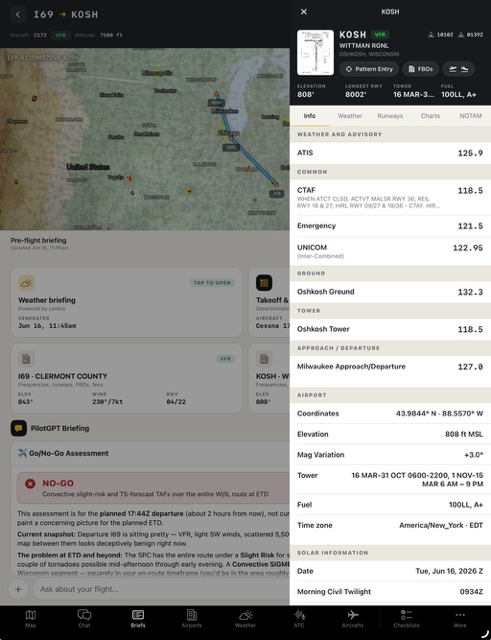
One of the most talked-about aviation AI products is PilotGPT. Unlike general-purpose AI tools, PilotGPT was built specifically for pilots. It combines aviation knowledge with weather information, airport data, aircraft documentation, and flight planning tools. The goal is to create a digital aviation assistant that can answer questions about weather, routes, airports, etc. in natural language. The appeal is obvious. Rather than navigating through multiple apps and websites, pilots can interact with a single interface and receive concise answers.
The challenge, of course, is trust. Aviation has little tolerance for incorrect information, and even the best AI systems occasionally provide inaccurate or incomplete responses. PilotGPT attempts to address this concern by grounding responses in aviation-specific data sources, but pilots still need to verify critical information independently.
Another consideration is cost. At nearly $500 per year, PilotGPT represents a significant investment compared to many aviation apps.
To see how well it performed, I used PilotGPT to brief a VFR flight from Clermont County Airport (I69) in Ohio to Oshkosh (KOSH), a popular long-distance trip many pilots contemplate each summer.
Within seconds, PilotGPT summarized the route weather, highlighted the potential for afternoon thunderstorms, and identified convective activity as the primary risk factor. It also suggested several follow-up questions that could help refine the analysis.
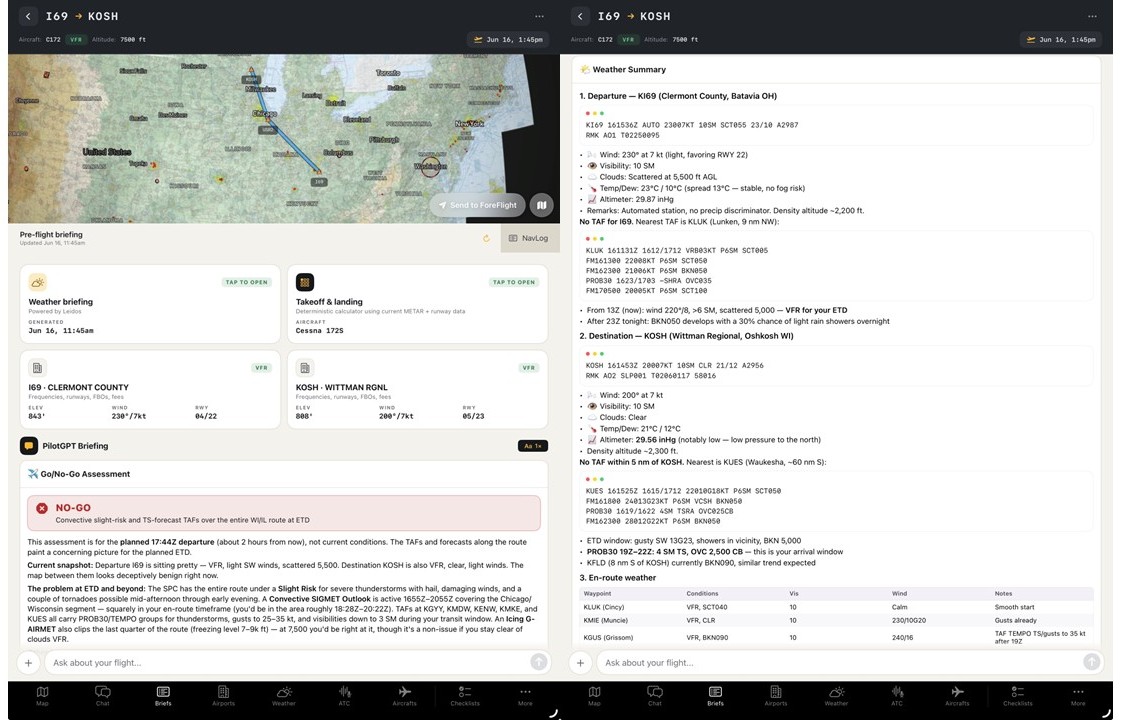
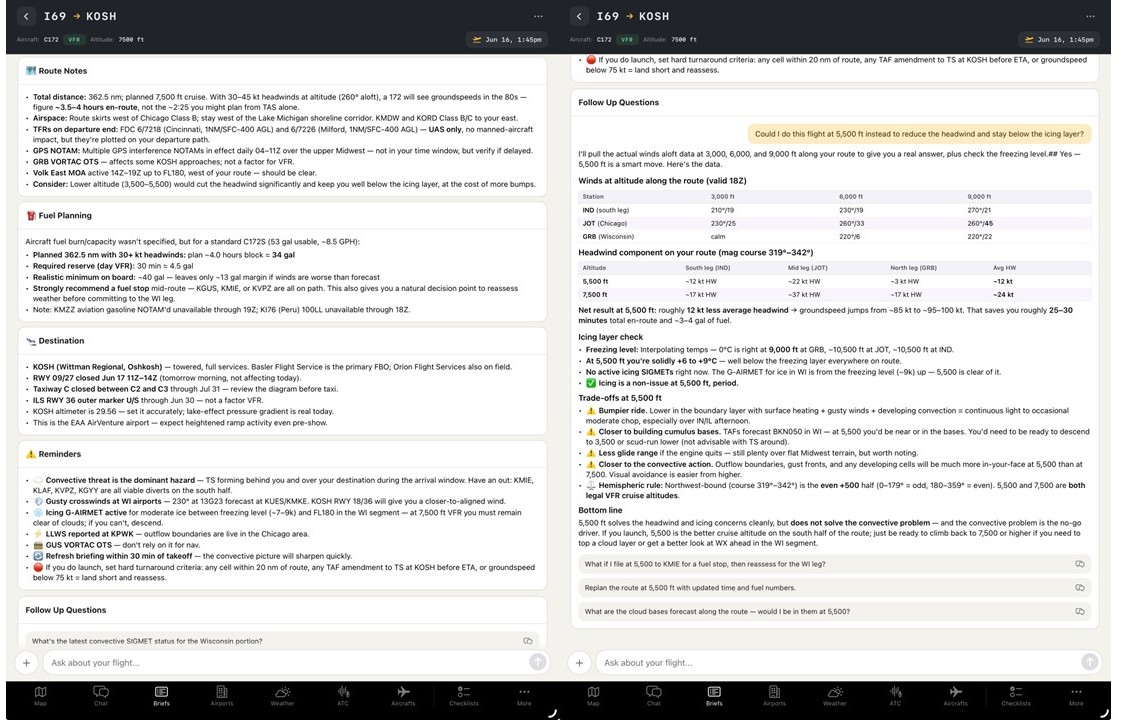
After using PilotGPT, I came away with a different view of aviation AI. The value wasn’t that it made a go/no-go decision for me. The value was that it acted like a knowledgeable participant during the planning process—summarizing information, identifying risks, and suggesting questions I might not have considered.
PilotGPT offers a 7-day free trial. An annual subscription is $479.99. Get the app here.
AI Weather Briefings
Perhaps the most practical use of AI today is weather interpretation.
Tools such as WxBrief Copilot focus on helping pilots understand weather information rather than replacing traditional weather products. Instead of simply displaying METARs, TAFs, AIRMETs, SIGMETs, and NOTAMs, the software attempts to summarize key concerns and identify potential risks. For many pilots, this may be where AI delivers the greatest value.
Weather briefings often contain large amounts of information, and important details can sometimes get lost in the volume of text. An AI-generated summary can provide a useful second look at the information and help pilots identify issues that deserve additional attention. The original weather products remain the official source. So AI may help interpret them, but it should not replace them.
For my test flight from Clermont County Airport (I69) to Oshkosh (KOSH), I received different experiences from the two AI-powered tools.
PilotGPT behaved much like a pilot sitting beside me. It reviewed the route weather, identified developing convective activity as the primary concern, and ultimately recommended against making the flight later in the day. Perhaps more importantly, it suggested several follow-up questions that encouraged a deeper analysis of the situation.
WxBrief took a different approach. Rather than offering a recommendation, it generated a structured weather briefing similar to what a pilot might receive from a traditional weather briefer. After I entered my personal minimums, the app evaluated the forecast conditions against those criteria, highlighted areas of concern, and even suggested possible mitigations. The final go/no-go decision, however, remained entirely with the pilot.
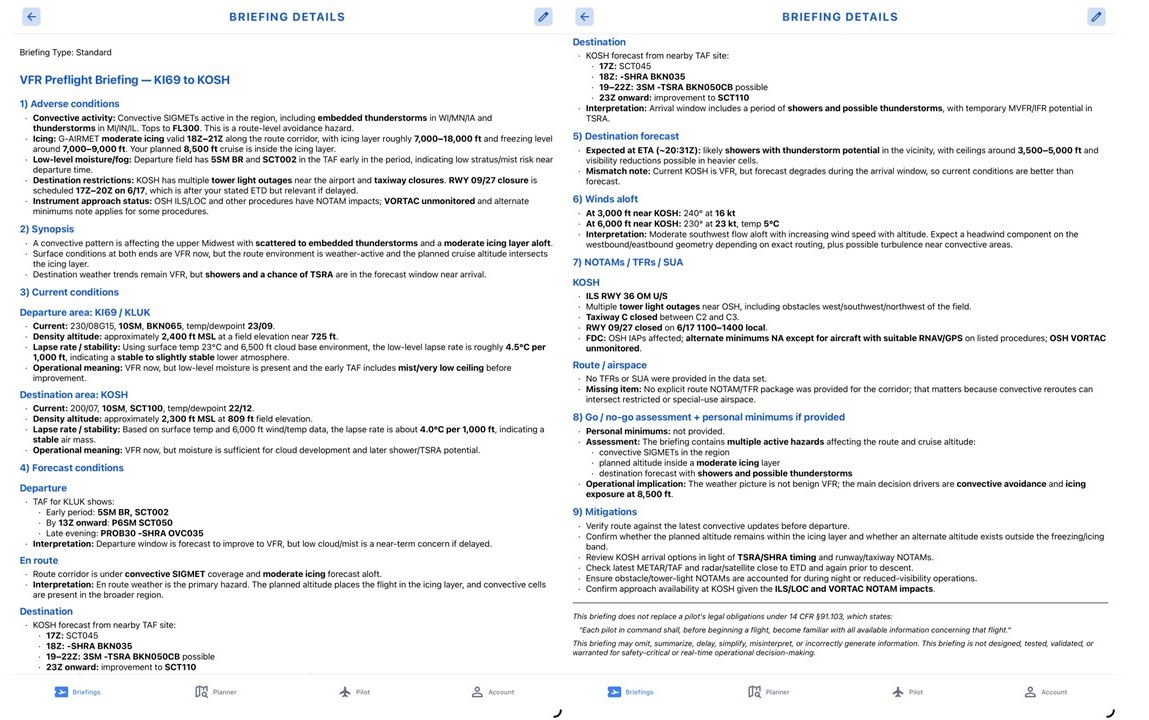
WxBrief offers a free trial of up to 20 briefings. A basic subscription (15 summaries per month) is available for $9.99 per month while the premium package offers unlimited sumarries for $14.99 per month. Get the app here.
AI as a Risk Management Tool
Another emerging category uses AI to evaluate risk rather than simply gather information. These tools analyze factors such as weather, pilot currency, aircraft performance, route complexity, and personal minimums to identify areas of concern before departure. This concept may ultimately prove more valuable than AI-generated flight planning.
Experienced pilots already perform some form of risk assessment before every flight. An AI tool can act as a second set of eyes, highlighting factors that might otherwise be overlooked. Importantly, these systems are not making decisions. They are identifying considerations and that distinction matters.
The final go/no-go decision still belongs to the pilot in command.
PreFlightIQ: A Different Approach to Risk
While PilotGPT focused on conversation and WxBrief focused on weather analysis, PreFlightIQ approached the flight from an entirely different direction.
After creating pilot and aircraft profiles, I shared my ForeFlight flight plan from Clermont County Airport (I69) to Oshkosh (KOSH). Rather than generating a traditional weather briefing, the app produced a detailed risk assessment. The report identified primary risk drivers, highlighted numerous individual risk factors, and assigned each one a status ranging from green and yellow to red or unknown. It also provided potential mitigation strategies designed to reduce overall risk exposure.
What stood out most was the level of granularity. Instead of producing a simple go/no-go recommendation, the app broke the flight into a series of risk elements that could be evaluated individually. The result wasn’t a decision. It was a framework for making one.
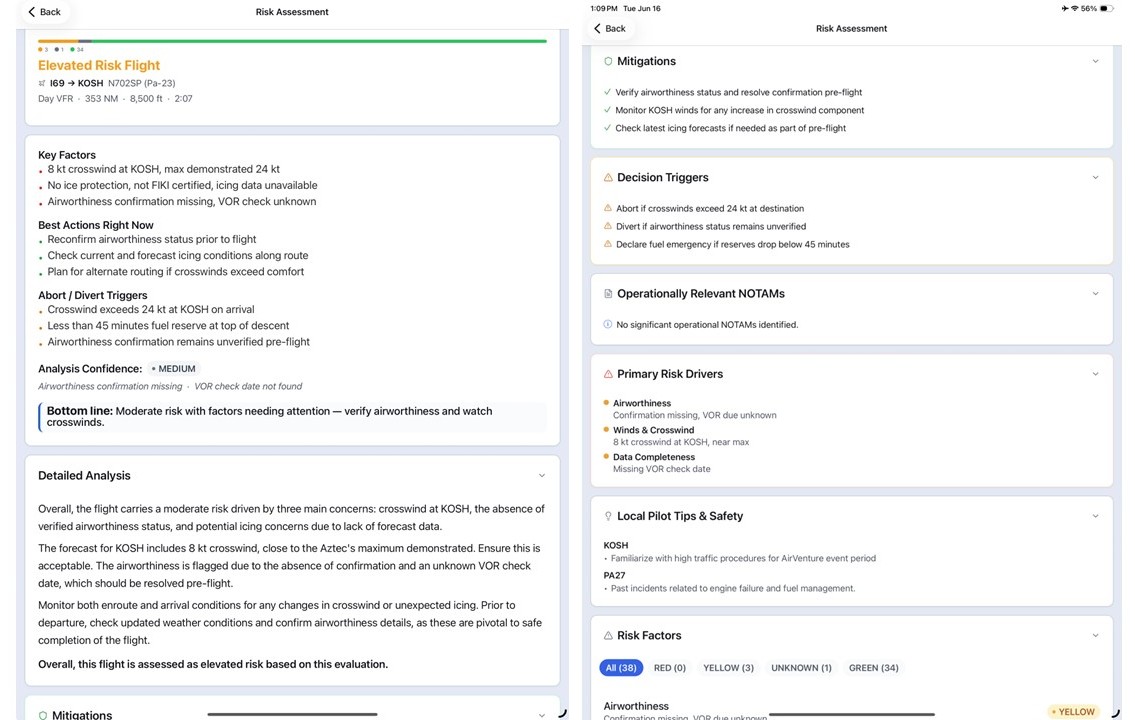
PreFllightIQ offers a free trial of 10 risk assessments. A basic subscription of 10 assessments per month is available for $2.99 per month. A pro-leval subscription is available for $4.99 per month for up to 20 asessments and an annual pro-level subscription is offered for $44.99 for up to 25 asssessments per month. Get the app here.
The AI App You Already Have
Of course, you may already have an AI assistant on your iPad. Many pilots have begun using ChatGPT and similar tools for aviation-related tasks. While these platforms are not certified aviation products and should never be relied upon as primary sources, they can be surprisingly useful for education and preparation.
For example, AI can:
- Translate METARs and TAFs into plain English
- Explain IFR procedures
- Clarify regulations
- Summarize FAA publications
- Create study materials for checkrides and recurrent training
In many ways, these educational uses may be the safest and most effective application of AI in aviation today. Using AI to understand information is very different from using AI to make operational decisions.
What AI Does Well
After experimenting with several aviation AI tools, a pattern emerges.
AI is generally good at:
- Summarizing large amounts of information
- Explaining complex concepts
- Organizing data from multiple sources
- Identifying items that may deserve additional review
- Answering routine questions quickly
These capabilities can save time and reduce workload during preflight planning.
What AI Does Poorly
Just as importantly, AI still struggles with several areas that are central to aviation decision-making. AI does not possess judgment.
It does not understand your personal experience level, fatigue, risk tolerance, aircraft condition, or operational environment. It cannot fully appreciate subtle contextual factors that experienced pilots routinely incorporate into their decisions.
And despite rapid improvements, AI systems can still produce incorrect information with surprising confidence. And for that reason, AI should be viewed as an assistant rather than an authority.
Should You Use It?
The most useful aviation AI tools aren’t trying to replace pilots. They’re trying to reduce workload by organizing information, highlighting risks, and making complex data easier to understand.
Used appropriately, AI can serve as another valuable resource in the preflight planning process—much like an EFB, a weather app, or a flight planning service. But the technology remains exactly that: a resource. As pilots, we’re accustomed to evaluating information from multiple sources before making decisions. AI simply adds another source to the list. The responsibility for interpreting that information and deciding whether a flight is safe still belongs to the pilot.
Reader Poll

- The Sporty’s Pilot Training App Adds a New Garmin Autopilot Course - September 2, 2026
- New Flight Gear Backpack Built Around Starlink Mini - August 28, 2026
- ForeFlight Introduces ClearNOTAMs: Plain-English, AI-Powered NOTAMs - August 18, 2026


The sheer number of NOTAMs for any reasonably long flight is overwhelming. While a hard line view is the pilot should read and understand everything, I doubt that even 10% of pilots read every single line of every single NOTAM, say in a ForeFlight briefing. Recent fatal accidents, such as the medical flight with GPS jamming, and no airport weather reporting, or the crash into high elevation slack lines shows that A: Important NOTAMs are missed and B: they can fatal. I hope that AI could be used to highlight the critical NOTAMs rather than the current approach of dumping everything in a briefing and letting the pilot sort it out (or not). I’m not advocating any less of a review by the pilot but rather use AI as a check for missing critical items.
Suggest you try PlaneWX – high quality weather briefing, automatic refreshes, integrated FRAT, mentor network.
I did the trial for PilotGPT but it is honestly half baked. I like the idea, but I put in a simple flight from ATL to DAL and it provided an ODD altitude, come on, that is basic info.
There is no way I would pay $500 per year for that.
Using LLMs for this, in particular for assessments or decision making, is a terrible idea, from the point of view of an expert in security and reliability of AI and a pilot.